Item Master
By Naveen Soni on May 11, 2026
BeginnerItem Master Documentation
Introduction
The Item Master form is used to create and manage all items in the ERP system.
It acts as the base for Purchase, Sales, Inventory, Manufacturing, and Accounting processes.
In ERPNext, it helps manage all item information in one place so every department uses the same correct data.
It keeps item details clean, structured, and easy to use across the system.
It acts as the starting point for processes like:
- Purchase
- Sales
- Inventory Management
- Manufacturing
- Accounting
- Stock Entry
Fields in Item Master Form
Item Details Tab
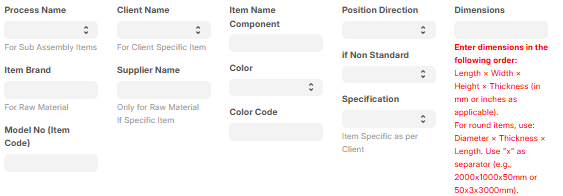
A. Process & Classification Section
1. Process Name: Defines the work process linked with the item.
2. Item Brand: Select the brand of the item.
3. Item Component: Defines the type or part category of the item.
4. Model No (Item Code): Used to enter item model number or unique code.
B. Client & Supplier Section
5. Client Name: Used when item is linked to a specific client.
6. Supplier Name: Defines main supplier of the item, mostly for raw materials.
C. Product Attributes Section
7. Color: Defines item color.
8. Color Code: Stores internal or standard color code.
9. Position / Direction: Used when item placement direction is required.
10. Non Standard: Enable when item is custom or not standard.
11. Specification: Used to write full item details.
D. Dimensions Section
12. Dimensions: Used to define item size.
Format:
Length × Width × Height × Thickness
Example:
2000x1000x50mm
E. Item Core Fields Section
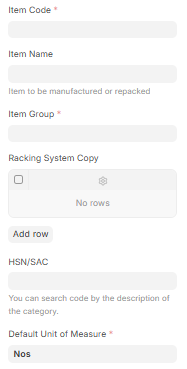
13. Item Code: Unique ID of the item. It is used to identify each item separately in the system.
14. Item Name: Name of the item shown in the system. It is used for easy identification of the item.
15. Item Group: Used to group similar items under one category for better organization.
16. HSN/SAC: Used for GST tax classification. It helps in applying correct tax rules on items or services.
17. Racking System Copy: This is a child table field used to define rack or storage system details for the item. Each row represents a rack mapping entry.
18. Default Unit of Measure: Defines the main unit in which the item is measured and stored in the system. Example: Nos, Kg, Meter.
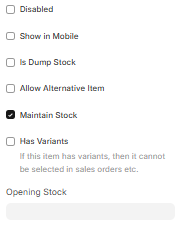
F. Item Settings Section
17. Maintain Stock: Enable if stock tracking is needed.
20. Has Variants: Enable if item has multiple versions (size/color).
21. Disabled: Used to stop using the item.
22. Show in Mobile: Allows item to show in mobile app.
23. Is Dump Stock: Used for scrap or waste items.
24. Allow Alternative Item: Allows replacement item in transactions.
for more info of Alternative item click hare
25. Is Fixed Asset: Enable if item is a fixed asset.
G. Stock & Pricing Section
26. Opening Stock: Starting stock quantity.
27. Valuation Rate: Cost price of item.
28. Standard Selling Rate: Default selling price.
29. Default UOM: Main unit of measurement.
H. Unit of Measure (UOM) Section
30. UOM: Unit like Nos, Kg, Meter, etc.
31. Conversion Factor: Used to convert one unit into another.
Tax Tab
A. ITC Control Section
32. Is Ineligible for Input Tax Credit (ITC): Enable if GST credit is not allowed.
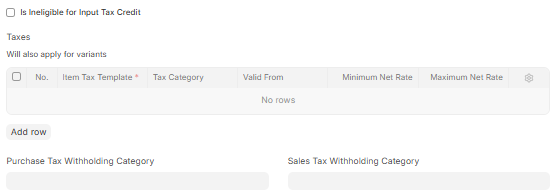
B. Tax Details Section
33. Item Tax Template: Pre-set tax rule for item.
34. Tax Category: Tax type classification.
35. Valid From: Start date of tax rule.
36. Min Net Rate: Minimum price allowed.
37. Max Net Rate: Maximum price allowed.
38. Purchase Tax Withholding Category: Tax deduction rule for purchase.
39. Sales Tax Withholding Category: Tax deduction rule for sales.
Quality Tab
A. Inspection Section
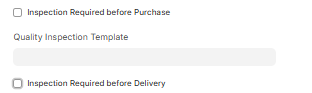
40. Inspection Required before Purchase: Quality check before purchase.
41. Quality Inspection Template: Pre-set quality check format.
42. Inspection Required before Delivery: Quality check before delivery.
Manufacturing Tab
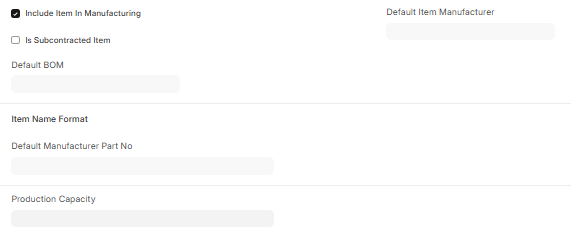
A. Production Settings Section
43. Include Item In Manufacturing: Enable this option if the item is used in the manufacturing process. It means the item will be included in production activities.
44. Is Subcontracted Item: Enable this option if the item is manufactured or supplied by an outside vendor (subcontractor) instead of internal production.
B. BOM Section
45.Default BOM: Select the default Bill of Materials for the item. It defines the standard list of raw materials, components, and sub-parts required to manufacture the product.
C. Manufacturer Details Section
46. Default Item Manufacturer: Defines the main manufacturer of the item. It identifies who regularly produces or supplies the item.
47. Item Name Format: Defines the naming format used by the manufacturer for the item. It helps in maintaining consistent naming between company and manufacturer records.
48. Default Manufacturer Part No: Stores the manufacturer’s part number or reference code for the item.
49. Production Capacity: Defines the maximum quantity that can be produced by the manufacturer within a specific time period.
Purchasing Tab
A. Purchasing Settings Section
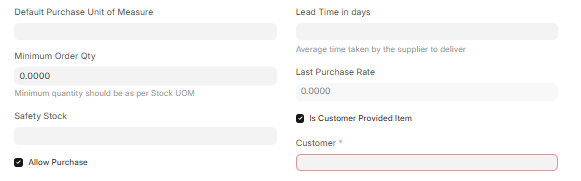
49. Default Purchase Unit of Measure: Unit used for purchasing the item.
50. Minimum Order Qty: Minimum quantity that can be ordered for purchase.
51. Safety Stock: Minimum stock level to avoid shortage.
52. Allow Purchase: Enable if item is allowed for purchase.
53. Lead Time in Days: Average time taken by supplier to deliver the item.
54. Last Purchase Rate: Last purchased price of the item.
B. Customer Provided Item Section
55. Is Customer Provided Item: Enable if item is supplied by the customer.
56. Customer: Select the customer who provides the item.
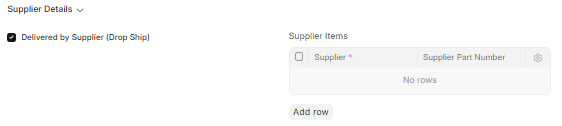
C. Supplier Details Section
57. Delivered by Supplier (Drop Ship): Enable if supplier directly delivers item to customer.
58. Supplier Items: Used to map item with supplier details.
59. Supplier: Main supplier of the item.
60. Supplier Part Number: Supplier’s own item reference number.
D. Foreign Trade Details Section
61. Country of Origin: Defines the country where the item is manufactured.
62. Customs Tariff Number: Used for customs and import/export classification.

Sales Tab
A. Sales Settings Section
55. Default Sales Unit of Measure: Unit used for selling the item.
56. Grant Commission: Enable if commission is applicable on sales of the item.
57. Allow Sales: Enable if the item is allowed for sales.
58. Max Discount (%): Maximum discount allowed on the item during sales.

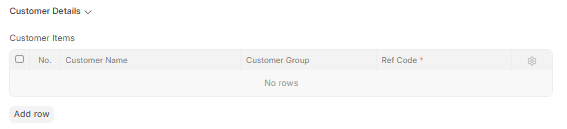
B. Customer Details Section
59. Customer Items: Used to map item with customer-specific details.
Each row includes:
- No.: Row number for reference.
- Customer Name: Name of the customer.
- Customer Group: Group/category of customer.
- Ref Code: Customer reference code for the item.
Inventory Tab
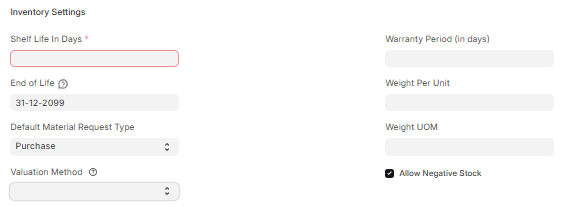
A. Inventory Settings Section
59. Shelf Life In Days: Defines how many days the item can be safely stored before it expires.
60. End of Life: Defines the last usable date of the item. After this date, the item should not be used.
61. Default Material Request Type: Defines the default type of material request created for this item (Purchase, Transfer, Issue, etc.).
62. Valuation Method: Defines how the item stock value is calculated in inventory (FIFO, LIFO, Moving Average).
63. Warranty Period (in days): Defines warranty duration of the item in days.
64. Weight Per Unit: Defines weight of one unit of the item.
65. Weight UOM: Unit used for weight measurement (Kg, Gram, etc.).
66. Allow Negative Stock: Enable if stock can go below zero in inventory.
B. Barcodes Section
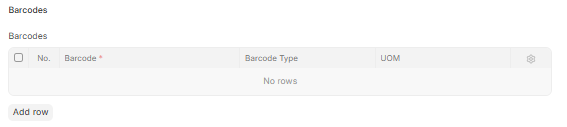
67. Barcodes: Used to store barcode details of the item for scanning purposes.
Each row includes:
- No.: Row number
- Barcode: Barcode number of item
- Barcode Type: Type of barcode used
- UOM: Unit linked with barcode
C. Auto Re-order Section
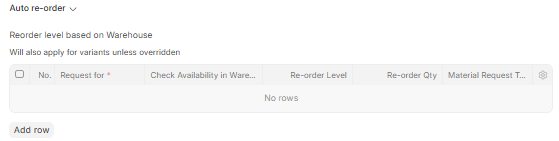
68. Reorder Levels: Used to automatically create material requests when stock goes low.
Each row includes:
Request For:
- Type of request to be created
- Check Availability in Warehouse: Warehouse where stock is checked
- Re-order Level: Minimum stock level to trigger reorder
- Re-order Qty: Quantity to be ordered
- Material Request Type: Type of material request generated
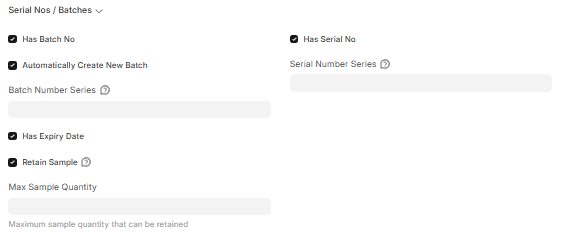
D. Serial Nos / Batches Section
69. Has Batch No: Enable if item is tracked by batch number.
70. Automatically Create New Batch: Enable if new batch is created automatically.
71. Batch Number Series: Defines numbering format for batches.
72. Has Expiry Date: Enable if item has expiry date.
73. Retain Sample: Enable if sample of batch is stored.
74. Max Sample Quantity: Maximum quantity allowed to keep as sample.
75. Has Serial No: Enable if item is tracked by serial number.
76. Serial Number Series: Defines numbering format for serial numbers.
Accounting Tab
A. Accounting Settings Section
67. Enable Deferred Expense: Enable if expense is to be recorded over a period of time instead of one time.
68. No of Months (Expense): Defines number of months over which expense will be distributed.
69. Enable Deferred Revenue: Enable if revenue is to be recorded over a period of time instead of one time.
70. No of Months (Revenue): Defines number of months over which revenue will be distributed.

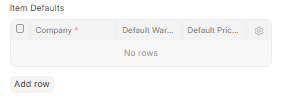
B. Item Defaults Section
71. Item Defaults: This is a table used to define company-wise default settings for the item.
Each row includes:
- Company: Select company name for which settings apply.
- Default Warehouse: Defines default warehouse for that company.
- Default Price List: Defines default price list for that company.
The explanation was very good. Adding examples made it much easier to understand.